

Inspect the capability behind a connection
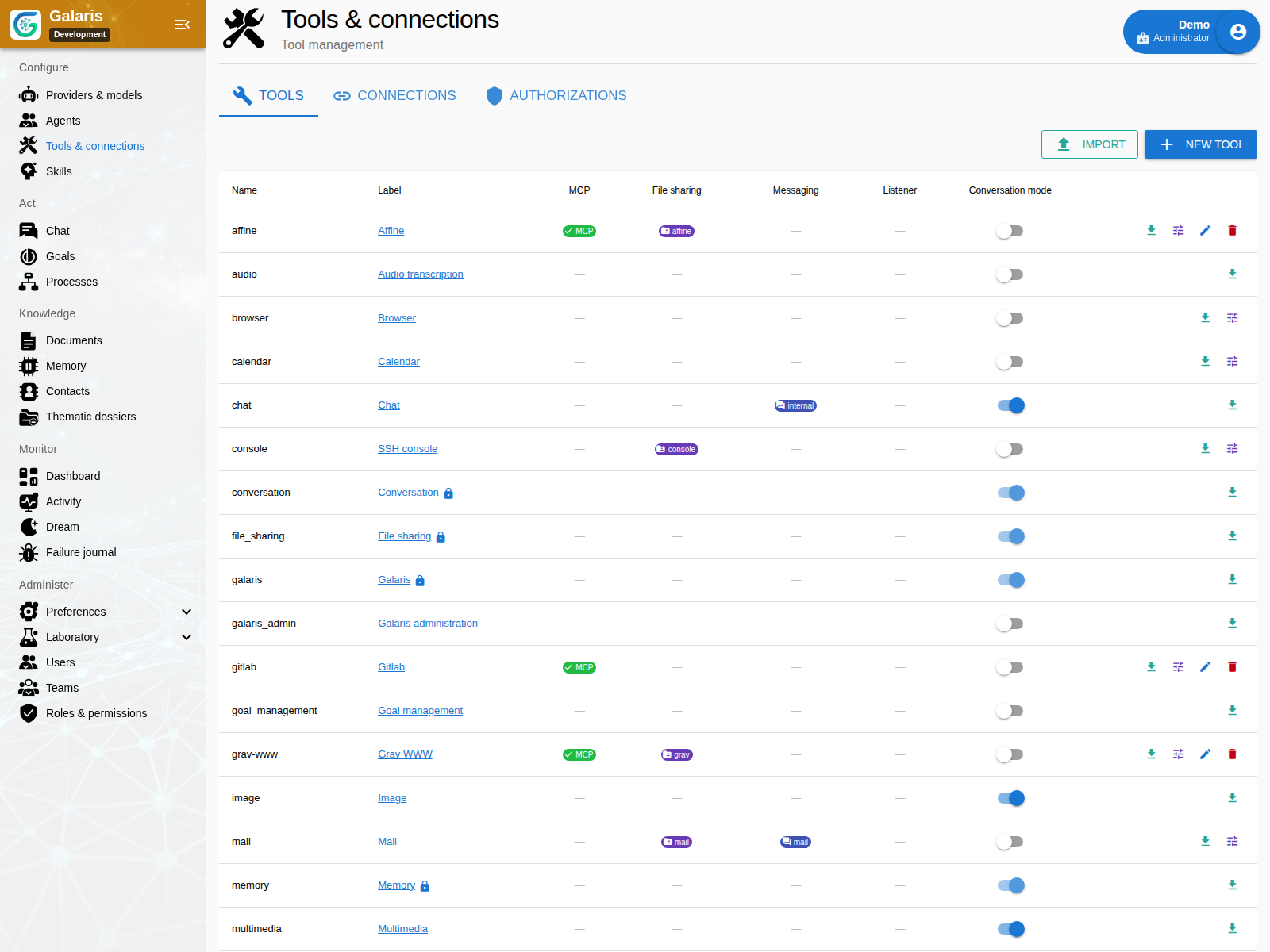
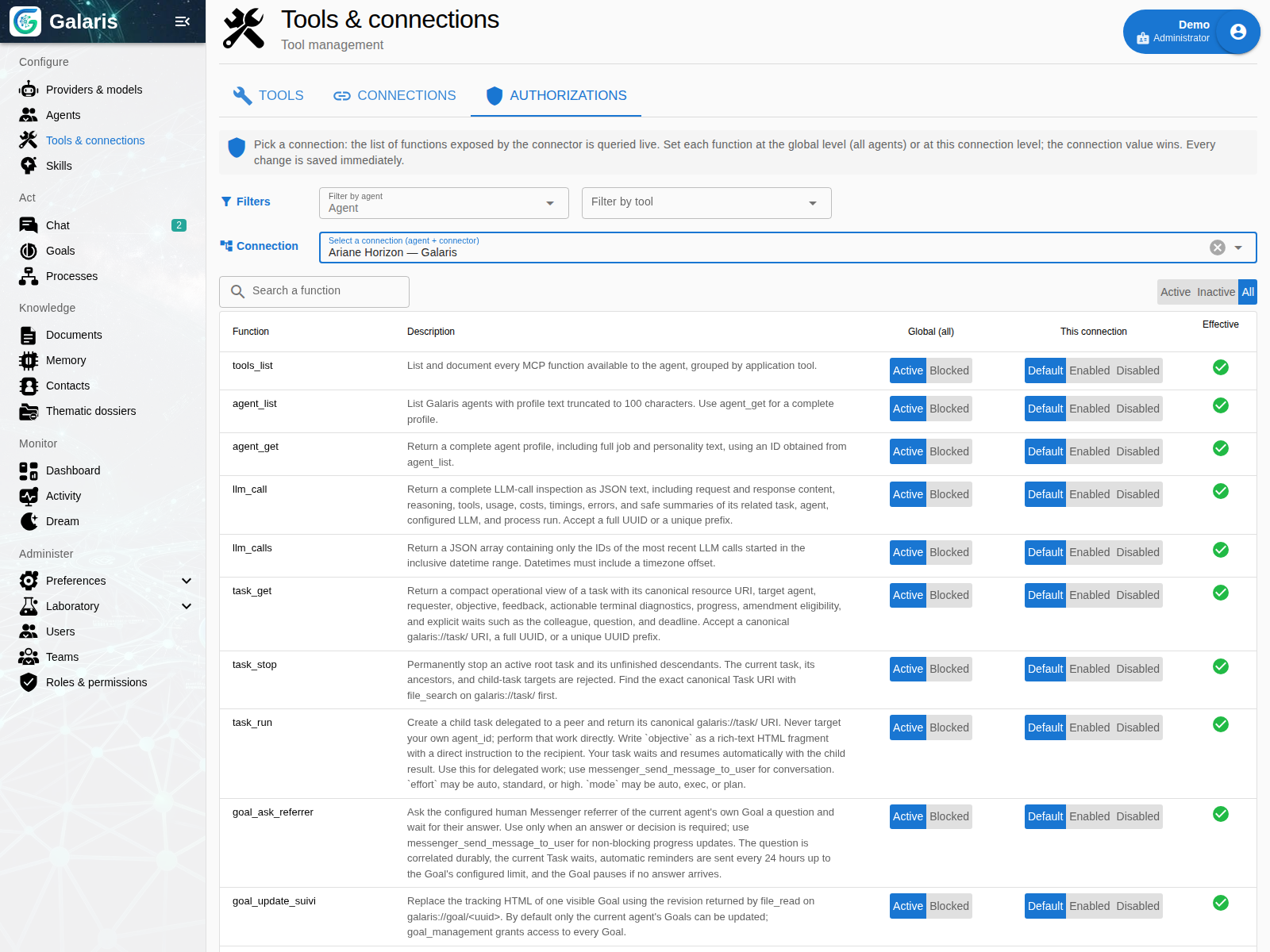
A Tool can expose MCP functions, file operations, messaging or an event listener. Availability is determined by an agent’s active connection and permitted functions. The catalogue alone does not grant access.
Files keep a stable address
Resource URIs identify the provider controlling each file. The agent can read and transfer supported resources without pretending they all live on a local disk. Provider capabilities govern each operation.
Channels connect people to agents
Messaging bridges preserve origin and recipient identity. A conversation can admit work and receive its result through the configured channel. File and voice support vary between transports.
Move resources when the work needs it
Keep the original URI while analysing a file. Copy it when the destination requires its own version, and retain the returned reference. This makes the source and delivered resource distinguishable.
Configure and test a connection
Connect MCP servers over HTTP/SSE or a stdio command. Configure endpoint, authentication, headers, timeout or environment according to transport. Connection tests distinguish network discovery, TLS, authentication, protocol and discovered functions.
Global values can be overridden per connection unless enforced. Secrets are encrypted and masked. Optional tool functions can be enabled separately; on-demand discovery searches only an already-authorised catalogue.
Find channels and specialist tools
Matrix, Nextcloud Talk, Telegram, WhatsApp and OneBot use canonical messaging. Message, file and voice capabilities vary by bridge. Observed identities populate Contacts without merging on a matching name.
Email, calendars, media and production tools have their own settings. The native inventory identifies functions separately from external MCP server tools.
Shared system services and chosen tools
Galaris, Conversation, Memory and File Sharing are four mandatory system services. Their connections are protected and their functions cannot be disabled like optional tools. Document permissions and context restrictions still apply.
Browser, Search, Image and Multimedia start active; existing decisions to disable or restrict them are preserved. Required AI resources and services must be configured. Galaris Admin and specialised management tools remain separate: mandatory system services do not grant administrative access.
What does MCP add to an AI agent?
MCP, the Model Context Protocol, provides a common way to expose tools to an AI client. In Galaris, connecting an MCP server makes its functions available through the authorised catalogue. The protocol alone does not supply credentials, permissions or business approval.
For a first trial, choose a read operation, configure the connection, inspect discovered functions and test access with the relevant agent. Review tool permissions before enabling write actions, then explore APIs and integrations to connect other applications.
Combine channels, engines and tools around Galaris
Configure MCP connections and fine-grained permissions in Galaris. The hub builds the function catalogue available to each agent, then presents it to the selected engine: Hermes Agent, DSH (DeepSeek Harness), Codex, Claude or the internal harness. Connections, enabled functions, permissions and engine capabilities determine this scope.
Consider a concrete setup: request a Notion page update from Telegram, with Hermes Agent as the task engine.
- Configure the Telegram bridge to receive requests for the agent.
- Connect the MCP server providing Notion access in Galaris, using a supported authentication method.
- Define permitted operations: reading, searching or editing authorised pages, according to the server’s functions and account permissions.
- Assign the Hermes engine to the agent. Galaris exposes authorised tools; the Notion connection remains managed in the hub.
- Send the mission from Telegram and check the result, task trace and expected changes.
This scenario illustrates a setup to prepare; it is not an execution performed for this site. Notion is connected through MCP here. Its MCP documentation describes available operations; transport and authentication compatibility must be checked for the selected server.
Channel, harness and business tool are separate choices. Use Galaris’s integrated chat, internal harness and documents, or combine your own entry points. Choose models and harnesses · Use Janus and APIs.
Explore the ecosystem compatible with Galaris: inference providers, messaging, harnesses and services, with links to their reference websites.